
Do you remember those faded family photographs, stuffed in an old shoebox or tucked away in a dusty album? The kind that showcases your parents on their wedding day, the joyful smile of your grandparents, or that chaotic family gathering where someone definitely tried to bring the fun? I do. Each image tells a story, yet time has a notorious knack for dulling their vibrancy, turning those treasures into mere shadows of their former selves. This January, I discovered a tool that changed everything—Google Gemini. The results? So real that at times, it felt slightly spooky.
Highlights
- ✨ Using Gemini for image restoration is easy and user-friendly.
- 🎨 The AI understands historical contexts for realistic photo enhancement.
- 💻 Quick results that can turn back the clock on your old photos.
- 🎉 Fully in control—if you don’t like something, you can easily adjust!
“Did you know that AI tools like Gemini are reshaping how we preserve memories, making it simpler to restore old photos than ever before?”
Why Bother Restoring Old Photos?
Honestly, why wouldn’t you? These images hold sentimental value—they’re the tangible links to our past, to familial stories that have shaped who we are today. Earlier, restoring a photograph was a tedious affair, requiring professional intervention and significantly denting your wallet. But with the emergence of AI tools, life has only become simpler. You can now revive those precious memories without leaving your home!
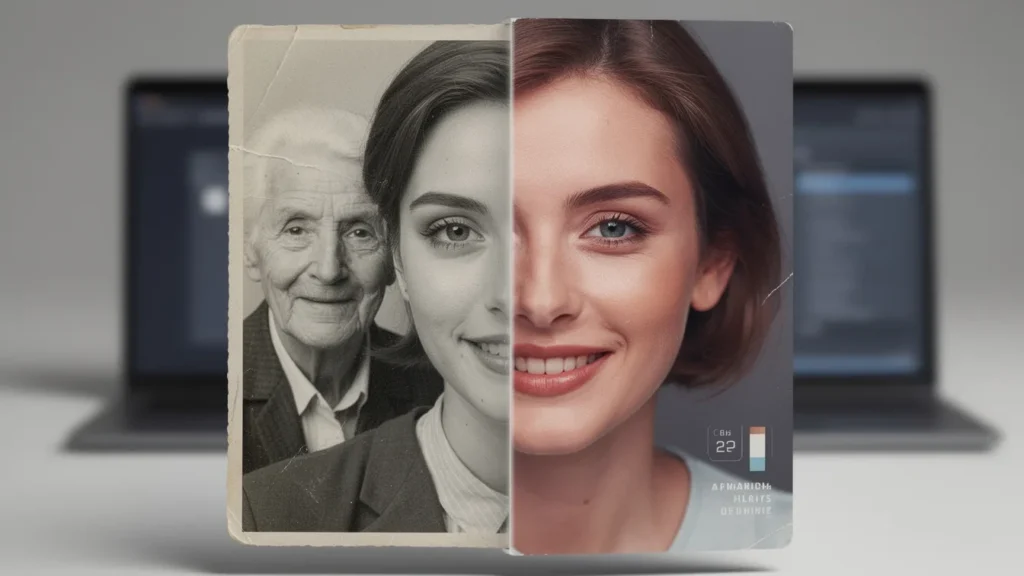
The charm of reintroducing colour and detail to black-and-white photos is nothing short of mesmerizing. It’s like stepping into a time machine, not only viewing your parents as they once were but also feeling the vibrant energies of those days.
How to Use Gemini for Stunning Results
Let’s get into the nitty-gritty—how do you actually use this wonder? The process is straightforward, and trust me, if I could do it, so can you.
- 📷 Get a Good Digital Copy: If you’ve got a scanner, perfect. Scan at least at 300 DPI. If not, your smartphone can save the day!
- 📝 Write Your Prompt: When you upload your photo onto Gemini, articulate your request. Examples include, “Restore this photo and colour it like modern-day 4K.” Simple, right?
- ♻️ Fine-Tuning: Once you receive your first results, don’t be shy. You can ask Gemini to tweak colours or better define the backgrounds.
- 💾 Download & Save: Happy with the adjustments? Download your new-found memory and relish the vibrant colours! Perfect for your family WhatsApp group or that empty wall you’ve been meaning to fill.
Remember that old photo of my parents from their wedding? I got emotional just looking at it. Once it was revitalized, it sparked conversations and laughter—memories shared with a vivid touch alright!
Why the AI Advantage?
What sets Gemini apart is not merely its high-tech enhancements; it’s how it seems to understand our nostalgia. Based on the myriad of images it processes, it knows what a natural blue sky looks like or the real texture of fabric from decades past. Imagine me, admiring a restored black-and-white snap, now bursting with life and colour! It felt like gazing into a glass ball, with stories from an era I only heard about.
Moreover, the turnaround is fast. In mere seconds, what once took hours can now be revived, allowing for seamless sharing of memories. You’re not just a spectator; you’re part of the creative process.
Final Thoughts: Let’s Discard the Dust and Capture the Light!
Let’s face it, the days of letting our family histories grow dim are over. Why let those heartfelt moments fade in black-and-white, when tools like Gemini breathe new life into them? It’s your very own digital time machine, ready to transport you back to the cherished days gone by.
So go ahead, open that attic door, crank that old album open, and breathe life into those moments. Every picture could use a modern glow, and who knows, you might find stories that have been waiting patiently for their turn in the spotlight.